2014年5月17日 星期六

Arduino 範例程式 - Serial port


硬體配置
   參考範例程式 "Arduino - LED"


程式
-----------------------------------------

-----------------------------------------


開啓 Tools -> Serial Monitor

結果 : 送出 "1", LED 會亮; 送出 "0", LED 會熄滅


2014年5月3日 星期六

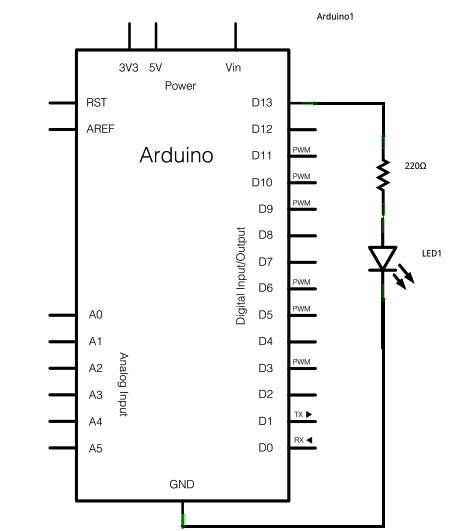
Arduino 範例程式 - LED


Ref: http://arduino.cc/en/Tutorial/Blink


這是一個基礎使用 LED 的範例程式

硬體設備

電路


可以使用軟體 Fritzing 來繪製

(1) 選擇 Arduino Uno Board


(2) 加入 LED 

image developed using Fritzing. For more circuit examples, see the Fritzing project page

和以下的範例電路不同, 我沒有另外增加電阻. 這是因為 Atmel 的 ATmega328P 本身內部已有 pull high 線路.


範例

實際

----------------------------------------------
----------------------------------------------

執行結果


參考

2014年4月30日 星期三

Arduino : 函式 loop()

Ref: http://arduino.cc/en/Reference/Setup


loop()

在 setup() 程式被執行後, 此程式會重複不停地被呼叫執行. 直到主板關閉電源為止. 


Example

 
const int buttonPin = 3;

// setup initializes serial and the button pin
void setup()
{
  Serial.begin(9600);
  pinMode(buttonPin, INPUT);
}

// loop checks the button pin each time,
// and will send serial if it is pressed
void loop()
{
  if (digitalRead(buttonPin) == HIGH)
    Serial.write('H');
  else
    Serial.write('L');

  delay(1000);
}


Arduino : 函式 Setup()

Ref: http://arduino.cc/en/Reference/Setup


setup()

初始化的函式, 當 sketch 執行時會呼叫此初始函式. 
通常用於 初始化變數, 初始化腳位, 開始使用函式庫,
此程式當 Arduino 主板電源啟動或重置時會被呼叫一次. 

Example

 
int buttonPin = 3;

void setup()
{
  Serial.begin(9600);
  pinMode(buttonPin, INPUT);
}

void loop()
{
  // ...
}


Arduino : Hello World

1. 開啓 Arduino 程式畫面


2. 輸入程式如下:

程式 :
-----------------------------------------------
-----------------------------------------------

3. Verify


4.  Upload


下載完成會出現 "Done Uploading"


5. 按 Arduino Uno 上紅色 Reset button

6. 開啓 Serial Monitor

7. 執行結果


程式架構


arduino uno


Summary

MicrocontrollerATmega328
Operating Voltage5V
Input Voltage (recommended)7-12V
Input Voltage (limits)6-20V
Digital I/O Pins14 (of which 6 provide PWM output)
Analog Input Pins6
DC Current per I/O Pin40 mA
DC Current for 3.3V Pin50 mA
Flash Memory32 KB (ATmega328) of which 0.5 KB used by bootloader
SRAM2 KB (ATmega328)
EEPROM1 KB (ATmega328)
Clock Speed16 MHz
Arduino Uno 的 微處理器 是 Atmel 的 ATmega328


線路圖與設計參考

EAGLE files: arduino-uno-Rev3-reference-design.zip (NOTE: works with Eagle 6.0 and newer)

2014年4月20日 星期日

村田頑童 - Murata boy

Ref: http://www.murata.com.cn/corporate/boy_girl/boy/index.html


村田頑童 - Murata boy

村田頑童®

身高50cm
體重約5kg
出生年月日9月29日
星座天秤座
愛好自行車運動
夢想環遊世界
座右銘百折不撓

影片介紹


(1) 安裝了陀螺儀感測器, 可以感測傾倒狀況 ( 一秒 2000 次感測 )
     陀螺儀感測器大小 : 長 10mm , 寬 10mm, 厚 3.3mm
(2) 轉動胸前的圓盤 ( 反作用輪 - Reaction Wheel ) 來維持平衡